
Not every rated call is a conversion. For example, you don’t want to count a service question in Google Ads, but you do want to count an appointment. Under ‘Conversies per leadclassificatie’ (Conversions per lead classification), you decide per classification whether a call with that rating goes to Google Ads as a conversion, to Google Analytics 4 (GA4) as a conversion event, or both.
Note: only admins can set this up. You need a connection with Google Ads and/or GA4.
Setting conversions per classification
- In the Qooqie call tracking application, go to Modules > Call Review > ‘Beoordelingsmenu’ (Review menu).
- Scroll to ‘Conversies per leadclassificatie’ (Conversions per lead classification). Here you see all your lead classifications listed one below the other.
- Under ‘Google Ads-conversie’ (Google Ads conversion), tick the classifications that should go to Google Ads as a conversion.
- Under ‘GA4-conversie-event’ (GA4 conversion event), tick the classifications that should go to GA4 as a conversion event.
- Click ‘Opslaan’ (Save).
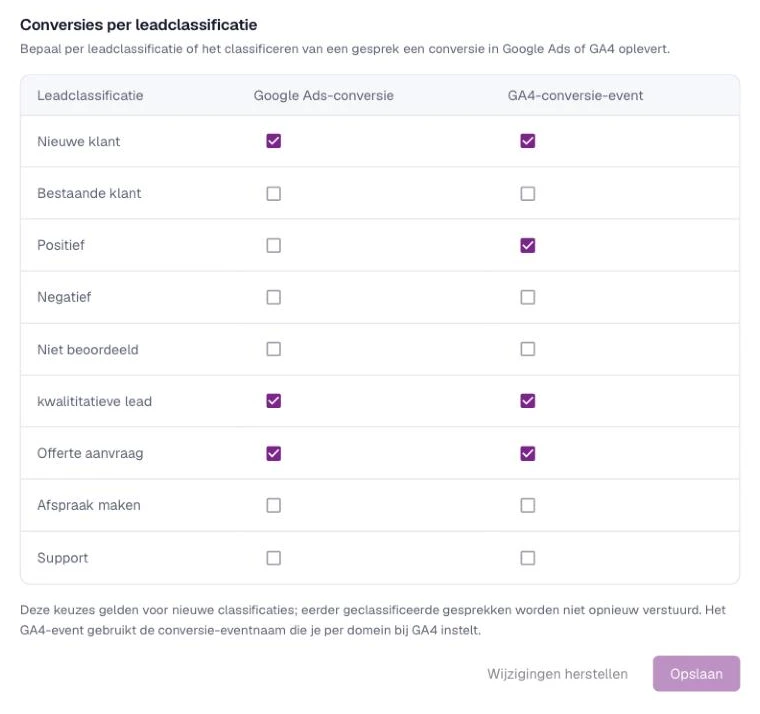
These choices apply to new classifications. Calls that were already rated before are not sent again.
Google Ads: turning on conversions
Can’t tick ‘Google Ads-conversie’? Then Google Ads conversions are off. Turn them on like this:
- Go to Integrations > Google Ads.
- Turn on ‘Conversies naar Google Ads versturen’ (Send conversions to Google Ads) and click ‘Opslaan’ (Save).
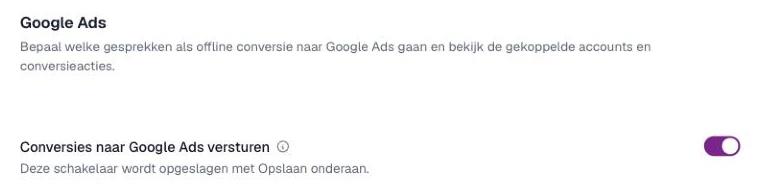
Your earlier choices per classification are kept, even while conversions are temporarily off.
Want to measure only rated calls as conversions? Then also turn on ‘Alleen beoordeelde gesprekken versturen’ (Only send rated calls) for Google Ads. A call then only becomes a conversion once it gets a classification you ticked here as a Google Ads conversion. If the classification has a default value, the conversion gets that value.
GA4: turning on the conversion event
The GA4 event uses the name you set per domain:
- Go to Integrations > Google Analytics 4 and choose the domain.
- Under ‘Conversie-event’ (Conversion event), turn on ‘Conversie-event inschakelen’ (Enable conversion event).
- Under ‘Naam conversie-event’ (Conversion event name), enter a name, for example lead_conversie.
- Click ‘Opslaan’ (Save).
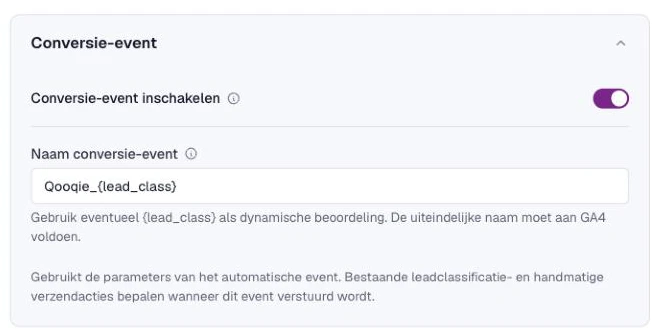
Mark this event name as a key event in GA4, so Google Analytics counts it as a conversion. Also read ‘How to measure calls as a key event in Google Analytics 4’.
How to measure calls as a key event in Google Analytics 4How does a call get a classification?
A call can get a classification in several ways: manually, with the phone key after the call, through a tag rule or automatically by AI. For the conversion, it makes no difference. Read more in ‘How to set up call rating’, ‘How to set up Call Tags’ and ‘How AI rates your calls automatically’.
How to set up call rating
