With the HubSpot integration, every call lands in your CRM automatically. Qooqie looks up the contact by phone number and logs the call as a call activity on that contact, with the duration, the phone numbers and whether it was answered. Your sales team sees the phone contacts right away.
Connecting HubSpot
- In the Qooqie call tracking application, go to Integrations > HubSpot.
- Click ‘Verbinden met HubSpot’ (Connect to HubSpot).
- Log in to HubSpot, choose the account you want to connect and give Qooqie access.
- You return to the Qooqie app. Did the connection succeed? Then you see ‘Gekoppeld aan HubSpot-account’ (Connected to HubSpot account) with the ID of your HubSpot account.
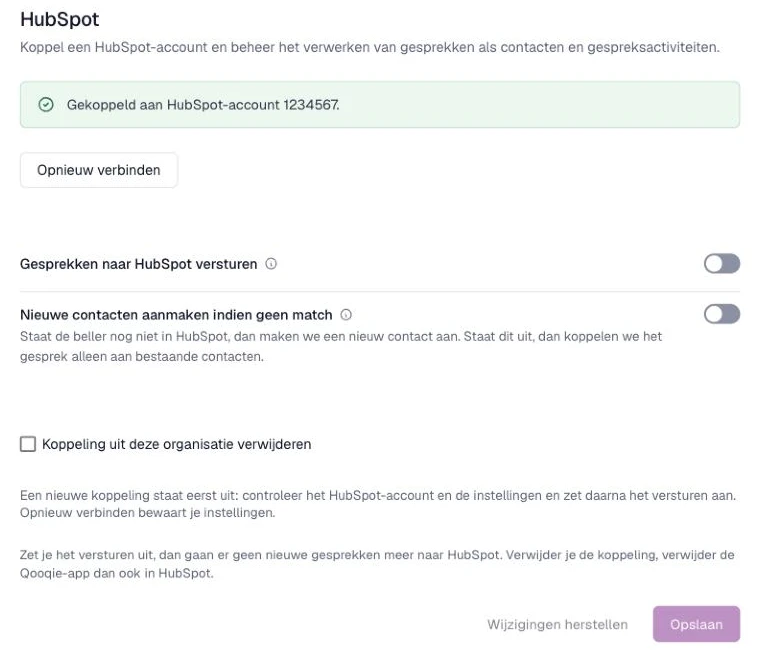
A new connection is off at first. So first check that the right HubSpot account is connected and that the settings are correct.
Settings
- ‘Gesprekken naar HubSpot versturen’ (send calls to HubSpot): turn on this toggle to send calls to HubSpot.
- ‘Nieuwe contacten aanmaken indien geen match’ (create new contacts if there is no match): if the caller isn’t in HubSpot yet, we create a new contact. That contact only gets the caller’s phone number. You add the name and other details yourself in HubSpot. If this is off, we only link calls to existing contacts.
Then click ‘Opslaan’ (Save).
Sending manually
Is a call not in HubSpot yet? Go to Calls > Overview, open the call and under ‘Doorsturen’ (Forward), click ‘HubSpot call event’.
Reconnecting or removing the connection
Has the connection stopped working, for example because access was revoked in HubSpot? Click ‘Opnieuw verbinden’ (Reconnect). Your settings are kept.
If you turn off sending, no new calls go to HubSpot. Want to remove the connection completely? First turn off ‘Gesprekken naar HubSpot versturen’ and click ‘Opslaan’. Then tick ‘Koppeling uit deze organisatie verwijderen’ (remove the connection from this organisation), confirm and click ‘Opslaan’. Afterwards, also remove the Qooqie app in HubSpot.
Note: Integrations are only visible to users with admin rights. Do you see the message ‘Verbinden met HubSpot is op dit moment niet beschikbaar’ (Connecting to HubSpot is currently unavailable)? Then contact your regular contact person at Qooqie.