With the Piwik PRO integration, you send phone conversions to Piwik PRO. Every incoming call arrives in Piwik PRO as a conversion, linked to the caller’s website visit if known. This way, your Piwik PRO reports also show which channels bring in phone calls.
Note: you need administrator rights in the Qooqie call tracking application.
Connecting Piwik PRO
- In the Qooqie call tracking application, go to Integrations > Piwik PRO.
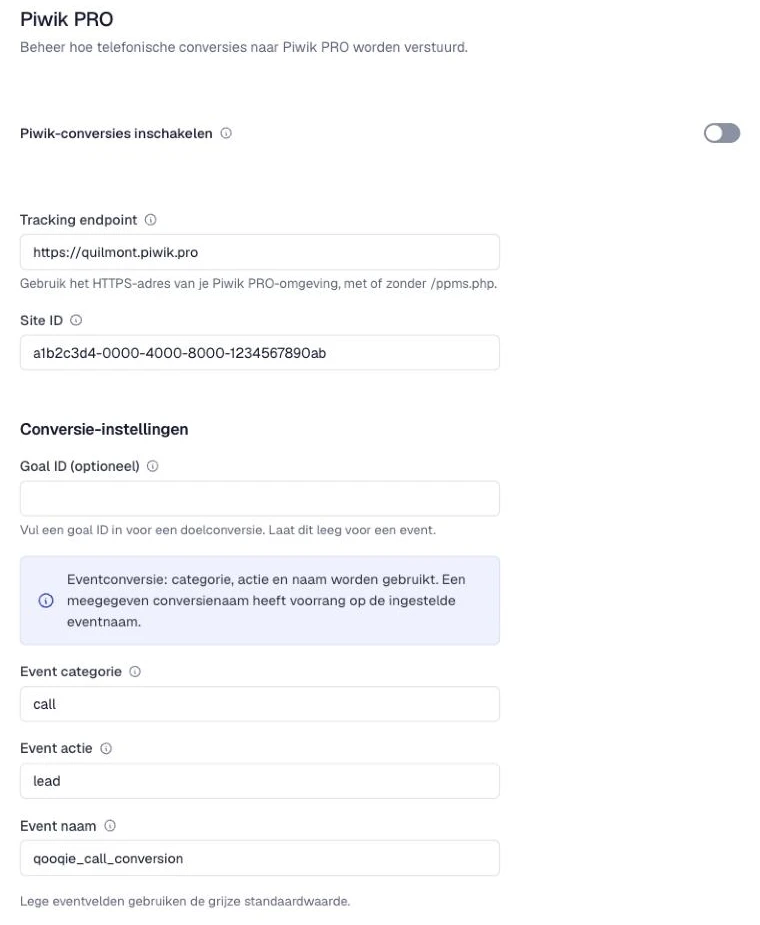
- Under ‘Tracking endpoint’, enter the address of your Piwik PRO account, usually https://yourcompany.piwik.pro. This may be with or without /ppms.php.
- Under ‘Site ID’, enter the ID of your website. You find it in Piwik PRO under Administration > Sites & apps.
- Under ‘Conversie-instellingen’ (Conversion settings), set how a call arrives in Piwik PRO (see below).
- Turn on ‘Piwik-conversies inschakelen’ (Enable Piwik conversions).
- Click ‘Opslaan’ (Save). Changes apply to new calls.
Goal or event
You can measure a call as a goal or as an event:
- Goal conversion – Under ‘Goal ID (optioneel)’ (Goal ID, optional), enter the number of a goal in Piwik PRO, for example 3. You find it in the list of goals (Goals). Every call then counts as a completed goal.
- Event conversion – Leave ‘Goal ID (optioneel)’ empty. The call then arrives as an event with an ‘Event categorie’ (Event category), ‘Event actie’ (Event action) and ‘Event naam’ (Event name). If you leave these empty, we use Calls, qualified_call and qooqie_call_conversion.
Value of a call
Does a call have a rating value? Then we send it along, even if it is zero. For this, read ‘How to set up call rating’. If the call has no value, we use ‘Standaard omzet (optioneel)’ (Default revenue, optional). If you leave that field empty, the value is 1. Use at most two decimals.
How to set up call ratingOnly calls with a website visit
The visitor ID comes from the website visit before the call. Turn on ‘Visitor ID vereist’ (Visitor ID required) if you only want to measure calls that can be linked to a visit in Piwik PRO. For calls without a visitor ID, no conversion is sent.
Token auth
Does your Piwik PRO account require a token to accept data from outside? Then fill in ‘Token auth (optioneel)’ (Token auth, optional) under ‘Authenticatie’ (Authentication). You get the token from your Piwik PRO administrator. After saving, the token is no longer shown.