Do you often get calls from the same unwanted number, for example a cold caller or a robot? Then add that number to the list of spam numbers. Calls from that number are then marked as spam. This can apply to all your destination numbers, or only to calls to one destination number.
Adding a spam number
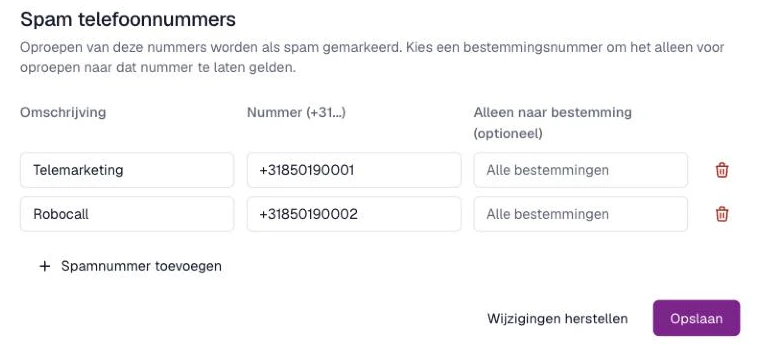
- Within the Qooqie call tracking application, go to Settings > Session Settings and open the ‘Spam telefoonnummers’ (Spam phone numbers) tab.
- Click ‘Spamnummer toevoegen’ (Add spam number).
- Under ‘Omschrijving’ (Description), enter a recognisable name, for example the caller’s name.
- Under ‘Nummer (+31...)’ (Number), enter the phone number. Use the international format, starting with +, for example +31201234567.
- Only want to mark the number for calls to one destination number? Then enter that destination number under ‘Alleen naar bestemming (optioneel)’ (Only to destination, optional). If you leave this field empty, it applies to ‘Alle bestemmingen’ (All destinations).
- Click ‘Opslaan’ (Save).
After saving you first see ‘De spamnummers worden doorgevoerd.’ (The spam numbers are being applied.) As soon as the message ‘De spamnummers zijn actief.’ (The spam numbers are active.) appears, calls from these numbers are marked as spam. Do you see ‘Verwerken is niet gelukt’ (Processing failed)? Then click ‘Opslaan’ once more.
Changing or deleting a spam number
- Change: edit the description or the numbers and click ‘Opslaan’ (Save).
- Delete: click the bin icon behind the number and confirm with ‘Verwijderen’ (Delete). The number only disappears from the list once you then click ‘Opslaan’.
‘Wijzigingen herstellen’ (Undo changes) reverts changes you have not saved yet.
Good to know
- You can add the same number with the same destination only once.
- Want to remove an earlier call from this number from your data? Read ‘How to delete calls’.
Note: only an administrator can view and change spam numbers. Do you see the message ‘Wijzigen is op dit moment niet beschikbaar’ (Changes are not available at the moment)? Then contact your regular contact person at Qooqie.