With webhooks, you automatically send call data to your own systems, such as a CRM or data warehouse. For every call, we send a message to an address (endpoint) that you specify. This article is mainly intended for the developer who builds the integration.
Note: you need administrator rights in the Qooqie call tracking application.
Setting up webhooks
- In the Qooqie call tracking application, go to Integrations > Webhooks.
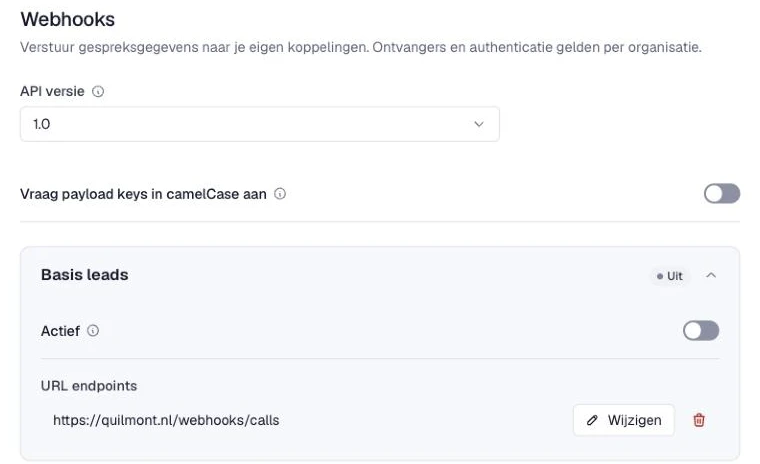
- Under ‘API versie’ (API version), only version 1.0 is available.
- Turn on ‘Vraag payload keys in camelCase aan’ (Request payload keys in camelCase) if you want field names like fromNumber instead of from_number. Only the top-level field names change.
- Open the event you want to receive a webhook for (see below).
- Under ‘URL endpoint’, enter the address. Use one https address per line, up to ten. Use an address of a public website, so no internal address, IP address or port.
- Turn on ‘Actief’ (Active).
- Click ‘Opslaan’ (Save). Changes apply to new calls, usually within a minute.
Which events are there?
- ‘Basis leads’ (Basic leads) – After an answered call from a new caller without a website visit, for example through an offline campaign.
- ‘Leads met sessie’ (Leads with session) – After an answered call from a new caller who called through your website.
- ‘Terugkerende leads’ (Returning leads) – After an answered call from a caller who has called before.
- ‘Gemiste leads’ (Missed leads) – When a call was not answered.
- ‘Actieve leads met sessie’ (Active leads with session) – Right at the start of an incoming call, while the call is still going on.
- ‘Leadgenerator API’ – When a tracking number is created, changed, deleted or restored through the Leadgenerator API.
Which fields are in the message?
We send the message as a POST with JSON. Per event, the message contains these fields, among others:
- For a call: id, call_id, from_number, to_number, start, end, duration, duration_real, campaign_id, campaign_name, campaign_media_type, lead_class, lead_class_value, lead_type, branch_id, branch_name, lead_description, external_id and recording.
- With ‘Leads met sessie’, the website visit data is added, such as domain, pathname, referrer, keywords, gclid, cid, the UTM tags (utm_source, utm_medium, utm_campaign, utm_term, utm_content), group_name and ad_name. Missed and returning leads also contain this data if the caller came through your website.
- ‘Actieve leads met sessie’ contains the caller, number, campaign and the website visit if known. Duration and rating are not included yet.
- ‘Leadgenerator API’ contains phone_number, external_id and action.
Authentication
Open ‘API secret en Basic Auth’ (API secret and Basic Auth):
- API secret – Enter a long random text without spaces and also store it in your own system. Each webhook then gets an X-Signature header: an HMAC-SHA256 of the JSON with this key. This lets you check that the message comes from Qooqie.
- Basic Auth – Does your endpoint require Basic Auth? Then fill in ‘Basic Auth gebruikersnaam’ (Basic Auth username) and ‘Basic Auth wachtwoord’ (Basic Auth password). We then send an Authorization header with every request.
After saving, the secret, password and tokens in the URL are no longer shown.
Retries and rate limits
- Respond within 5 seconds with a 2xx status.
- On a timeout or server error, we try again later, a number of times, with increasing time in between.
- Does your endpoint respond with a permanent error, such as 400, 401, 403, 404 or 422? Then we do not try again.
- Does your endpoint limit the number of requests and send an X-RateLimit-Limit header with it? Then we temporarily pause your organisation’s webhooks. We wait for the time in the Retry-After or X-RateLimit-Reset header, or 60 seconds if it is missing. After that, we try again.