The activity log shows who did what in your account: who logged in, which settings, campaigns, numbers and users were changed, and which calls were rated or deleted. Useful when you want to know why something works differently than you expect.
Viewing the activity log
- Within the Qooqie call tracking application, go to Settings > Logboek (Activity log).
- Each line shows ‘Wanneer’ (When), ‘Gebruiker’ (User), ‘Actie’ (Action) and ‘Omschrijving’ (Description). By default you see the ‘Afgelopen 30 dagen’ (Last 30 days).
- Click a line for the details. For a change, you see the old and the new value per field.
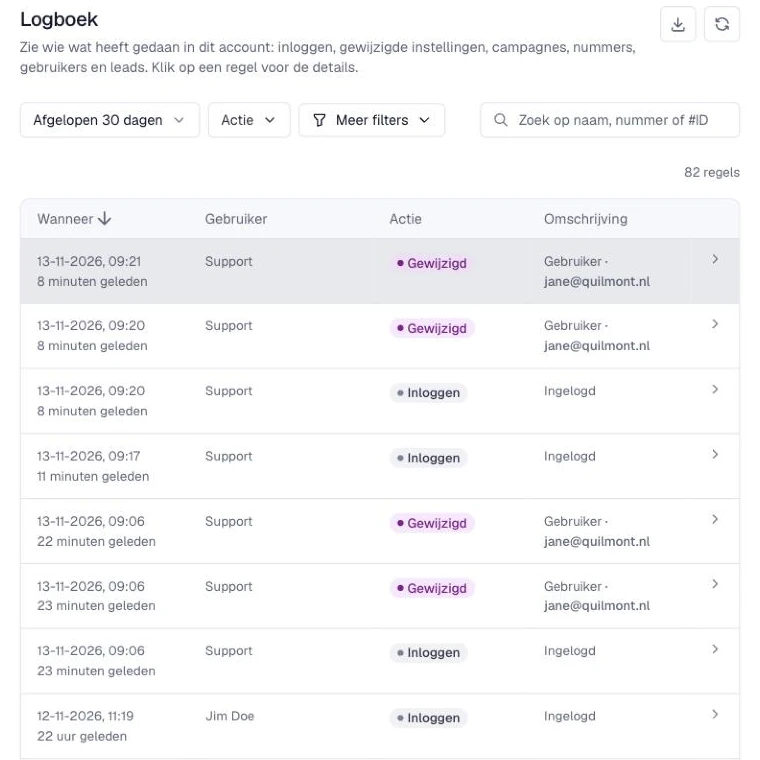
Changes that Qooqie Support made for you show ‘Support’ as the user. Automatic changes appear as ‘Automatisch’ (Automatic).
Filtering and searching
- ‘Periode’ (Period): choose, for example, ‘Vandaag’ (Today), ‘Afgelopen 7 dagen’ (Last 7 days), ‘Dit jaar’ (This year), ‘Alles’ (All) or an ‘Aangepaste periode’ (Custom period).
- ‘Actie’ (Action): for example ‘Toegevoegd’ (Added), ‘Gewijzigd’ (Changed), ‘Verwijderd’ (Deleted) or ‘Inloggen’ (Log in).
- ‘Onderdeel’ (Item): for example ‘Campagne’ (Campaign), ‘Bestemmingsnummer’ (Destination number) or ‘Gebruiker’ (User).
- ‘Alle gebruikers’ (All users): choose one user.
- Search field ‘Zoek op naam, nummer of #ID’ (Search by name, number or #ID): searches the description, the object and the user. For example, type #123 for a line or object with that ID.
In the details of a line you also find ‘Alles van deze gebruiker’ (Everything from this user) and ‘Alles van dit object’ (Everything for this object). These filter the activity log straight to that user or that item. ‘Filters wissen’ (Clear filters) shows everything again.
Exporting
Click the download icon ‘Exporteren als CSV’ (Export as CSV) at the top right to download the lines within your filters. With a very large number of lines, only the first lines are exported. In that case, narrow your filters and export the rest separately.
Note: only administrators can view the activity log.