With the Meta Ads integration, calls are sent to Meta as conversions automatically. You see in Meta which Facebook and Instagram ads bring in phone calls, and Meta can steer your campaigns based on that.
How it works
- Qooqie only sends calls from visitors who came to your website through a paid click on a Facebook or Instagram ad. Other calls are not sent.
- The Meta pixel must be on your website. Meta matches the call to your ad using that pixel’s cookie and the caller’s phone number. The pixel cookie alone is enough for this. If the visitor has no pixel cookie, Meta can’t match the call and we don’t send it.
- Changes apply to new calls. Earlier calls are not sent retroactively.
What do you need?
You enter three details from Meta Events Manager:
- ‘Gegevensset-ID’ (dataset ID): the ID of your dataset (pixel). You find it in Meta Events Manager under Data sources: choose your dataset and open Settings. The ID consists of digits only.
- ‘Gebeurtenisnaam’ (event name): the name under which the calls appear in Meta, for example Lead or Contact. Use the same name in your conversion goal or custom conversion.
- ‘Geheime sleutel (access token)’ (secret key): create this key in Meta Events Manager under the Conversions API. The key must belong to the same dataset as the ID.
Connecting Meta Ads
- In the Qooqie call tracking application, go to Integrations > Meta Ads.
- Under ‘Pixel en sleutel’ (pixel and key), enter the ‘Gegevensset-ID’.
- Enter the ‘Gebeurtenisnaam’.
- Paste the key into ‘Geheime sleutel (access token)’.
- Turn on the ‘Conversies naar Meta inschakelen’ (enable conversions to Meta) toggle.
- Click ‘Opslaan’ (Save).
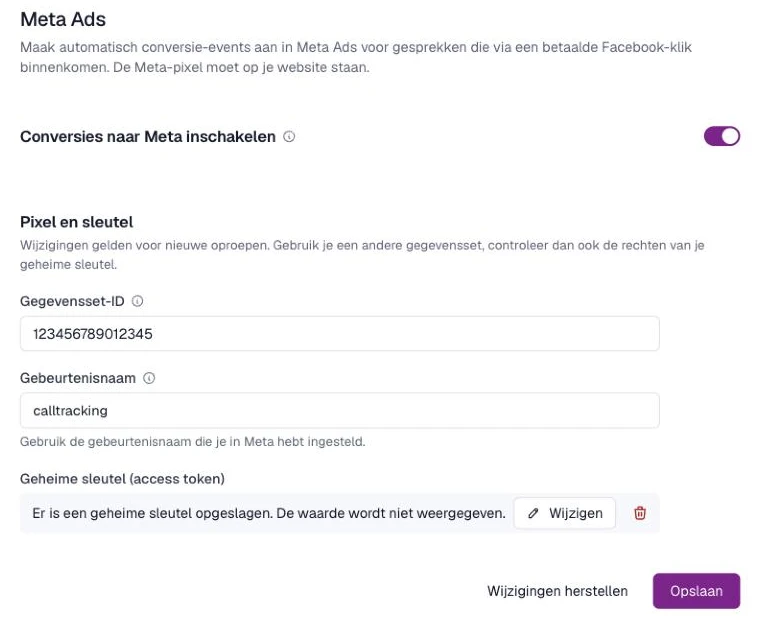
You can only turn it on once all three details are filled in.
Replacing the key or turning off the integration
After saving, the key is no longer shown. Instead you see ‘Er is een geheime sleutel opgeslagen. De waarde wordt niet weergegeven.’ (A secret key is stored. The value is not shown.) Want to use a new key? Click ‘Wijzigen’ (Change), paste the new key and click ‘Opslaan’. Using a different dataset? Then also check that your key has rights to that dataset.
Want to remove the key? First turn off the ‘Conversies naar Meta inschakelen’ toggle. Without a key, we can’t send conversions.
Note: Integrations are only visible to users with admin rights. Do you see the message ‘Je kunt deze instellingen bekijken. Wijzigen staat momenteel uit.’ (You can view these settings. Editing is currently off.)? Then contact your regular contact person at Qooqie.