With the Microsoft Ads integration, calls count as offline conversions in Microsoft Ads. Qooqie creates an import URL for this. Microsoft Ads fetches your calls through that URL itself at set times, using a scheduled import.
How it works
- Only calls with a Microsoft click ID (msclkid) are included. These are calls from visitors who came to your website through a click on your Microsoft ad.
- In each fetch, Microsoft Ads picks up the pending calls from the past 90 days. You set how often this happens in Microsoft Ads.
- The conversion value comes from the call’s lead classification. If a call has no value, Microsoft uses the conversion goal’s default value.
- Your Microsoft campaign in Qooqie must be on. If it’s off, you see a message about it at the top of the page.
Creating the import URL in Qooqie
- In the Qooqie call tracking application, go to Integrations > Microsoft Ads.
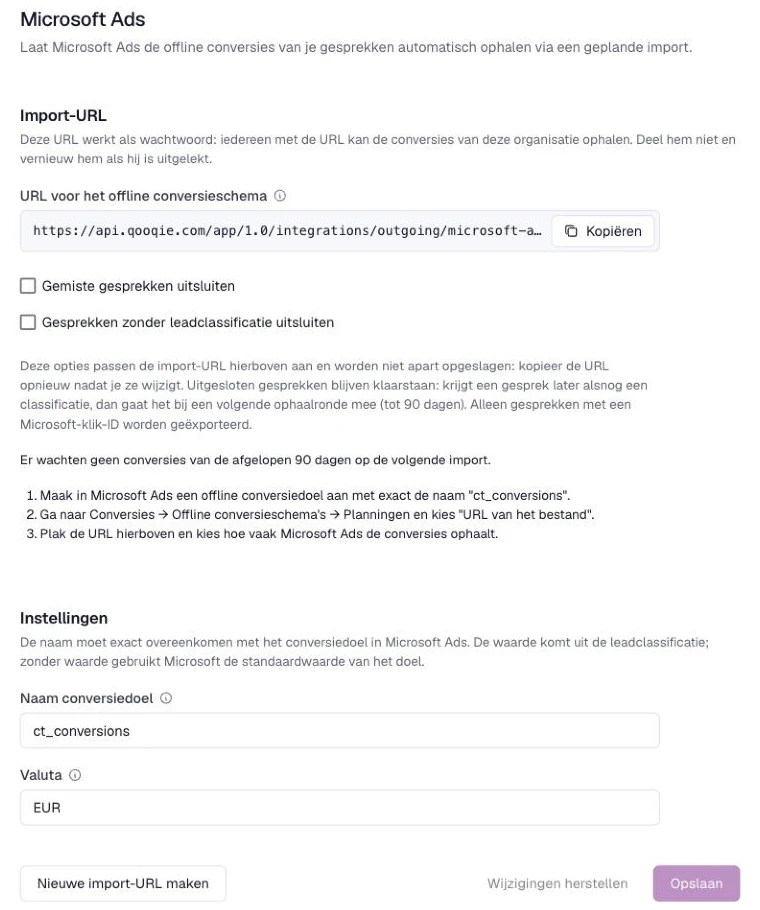
- Click ‘Import-URL aanmaken’ (Create import URL).
- Under ‘Instellingen’ (Settings), check the ‘Naam conversiedoel’ (conversion goal name, ct_conversions by default) and the ‘Valuta’ (currency, EUR by default). Use the same currency as your Microsoft Ads account. Changed something? Then click ‘Opslaan’ (Save).
- Optionally choose ‘Gemiste gesprekken uitsluiten’ (exclude missed calls) and/or ‘Gesprekken zonder leadclassificatie uitsluiten’ (exclude calls without a lead classification). These options change the import URL and are not saved separately.
- Next to ‘URL voor het offline conversieschema’ (URL for the offline conversion schedule), click ‘Kopiëren’ (Copy).
Setting up the scheduled import in Microsoft Ads
- In Microsoft Ads, create an offline conversion goal with exactly the same name as in ‘Naam conversiedoel’.
- Go to Conversions > Offline conversion schedules > Schedules and choose ‘File URL’.
- Paste the import URL and choose how often Microsoft Ads fetches the conversions.
The page in Qooqie shows how many conversions from the past 90 days are waiting for the next import. Excluded calls stay ready: if a call gets a classification later on, it is included in a following fetch.
Renewing the import URL
The import URL works like a password: anyone with the URL can fetch your organisation’s conversions. So don’t share it. You also can’t open the URL in your browser to test it. Has the URL leaked? Click ‘Nieuwe import-URL maken’ (Create new import URL). The old URL stops working immediately, so replace it right away in your offline conversion schedule in Microsoft Ads. Pending conversions are kept.
Note: if you change the ‘Naam conversiedoel’ or an exclusion option, copy the URL again or adjust the goal in Microsoft Ads. Integrations are only visible to users with admin rights.