In the Qooqie call tracking application you download your invoices and see what your next invoice costs. You also see how many sessions and call minutes you have used this month.
Note: Billing is only visible to administrators and partners.
Viewing and downloading invoices
- In the Qooqie call tracking application, go to Settings > Billing > Invoices.
- For each invoice you see the date, the amount and the status: ‘Verwerkt’ (Processed) or ‘Openstaand’ (Outstanding).
- Click the eye icon to view the invoice, or the download icon to save the PDF.
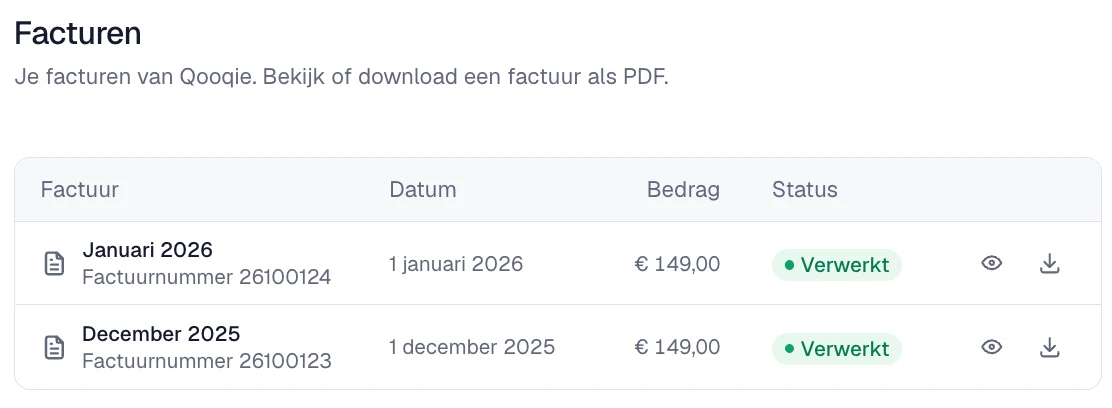
Do you see ‘De factuur is nog niet beschikbaar’ (The invoice is not available yet)? Then try again in a minute.
Viewing costs and usage
Go to Settings > Billing > Costs/Usage. Here you see:
- Your subscription: the package with its price and any discount. Did you start halfway through the month? Then the remaining days of that month are listed separately.
- ‘Extra gekozen producten’ (Extra selected products): for example extra destinations or domains.
- ‘Variabele kosten’ (Variable costs): extra session bundles if you use more sessions than your bundle includes, and this month’s call costs.
- ‘Totaal (eerstvolgende factuur)’ (Total, next invoice): the total after discount.
Is your trial still running? Then you do see the costs, but they are not charged.
Usage this month
Under ‘Verbruik deze maand’ (Usage this month) you see how many sessions you have used out of the number in your bundle. Below that you see how many sessions you have left, or how far you are over. Under ‘Belminuten’ (Call minutes) you see this month’s call time.
Under ‘Modules’ you see what is included in your subscription: the number of sessions per month, offsite numbers, domains and destinations, and whether the API integration is included.
Note: you only see Costs/Usage if you are also allowed to take out a subscription: the owner or an administrator of the organization, or the partner who receives the invoices. Do you see ‘De kosten kun je hier niet bekijken’ (You cannot view the costs here)? Then contact your regular contact person at Qooqie.
Want a different package? Then read ‘How to choose or change your subscription’.
How to choose or change your subscription