LEF is a lead management system for car dealerships. With the LEF integration, every call arrives in LEF as a phone lead. You link a LEF account number to each branch. This way, every lead goes straight to the right LEF account.
Note: you need administrator rights in the Qooqie call tracking application. You get the URL, username and password for the integration from LEF.
Connecting LEF
- In the Qooqie call tracking application, go to Integrations > LEF.
- Under ‘Verbinding en inloggegevens’ (Connection and credentials), enter the ‘URL’ of the LEF integration. It starts with https://.
- Enter the ‘Gebruikersnaam’ (Username) and ‘Wachtwoord’ (Password) you received from LEF.
- Under ‘Accountnummers per vestiging’ (Account numbers per branch), enter the LEF account number for each branch. Enter at least one.
- Turn on ‘Koppeling inschakelen’ (Enable integration).
- Click ‘Opslaan’ (Save).
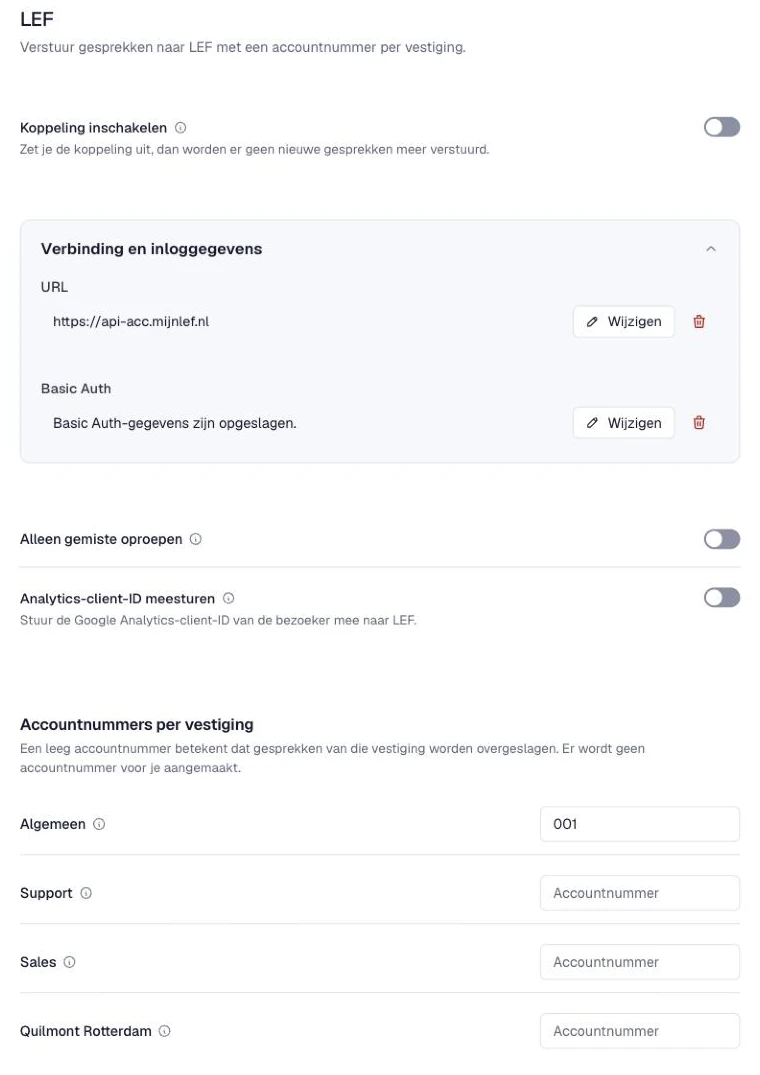
Leave a branch’s account number empty? Then calls from that branch are skipped. No account number is created for you. You manage your branches under Settings > Destinations.
Extra settings
- ‘Alleen gemiste oproepen’ (Missed calls only) – Only calls that were not answered go to LEF, so your team can call them back. Answered calls are then skipped.
- ‘Analytics-client-ID meesturen’ (Send Analytics client ID) – Does a website visitor call? Then the Google Analytics client ID appears as CRCiD on the lead in LEF. This lets you link the lead to the visit in Google Analytics.
- ‘Campagnes uitsluiten’ (Exclude campaigns) – Under ‘Uitgesloten campagneteksten’ (Excluded campaign texts), enter one text per line. Calls from campaigns whose name contains such a text do not go to LEF. Capitals do not matter. For example, ‘Vacature’ excludes ‘Vacature website’ and ‘Vacature Indeed’. Those calls do stay visible in call tracking.
Good to know
Calls from an anonymous number are not sent to LEF. If you turn off the integration, no new calls are sent.
Want to remove the integration completely? Open ‘Koppeling verwijderen’ (Remove integration), tick ‘Ik bevestig dat ik deze koppeling wil verwijderen’ (I confirm that I want to remove this integration), confirm and click ‘Opslaan’ (Save). The settings and credentials are then removed. Earlier transmissions are not reversed.