With Call Tags, calls are labelled automatically by topic, such as ‘quote’, ‘complaint’ or ‘appointment’. After every call, the AI checks which of your tags come up in the conversation. With rating rules, you automatically give a call with certain tags a classification and a value.
Note: Call Tags only work if call recording and Call Summary are on. Read ‘How to turn on call recording’ and ‘How to turn on Call Summary’. Only admins can set up tags and rules.
How to turn on Call SummaryAdding tags
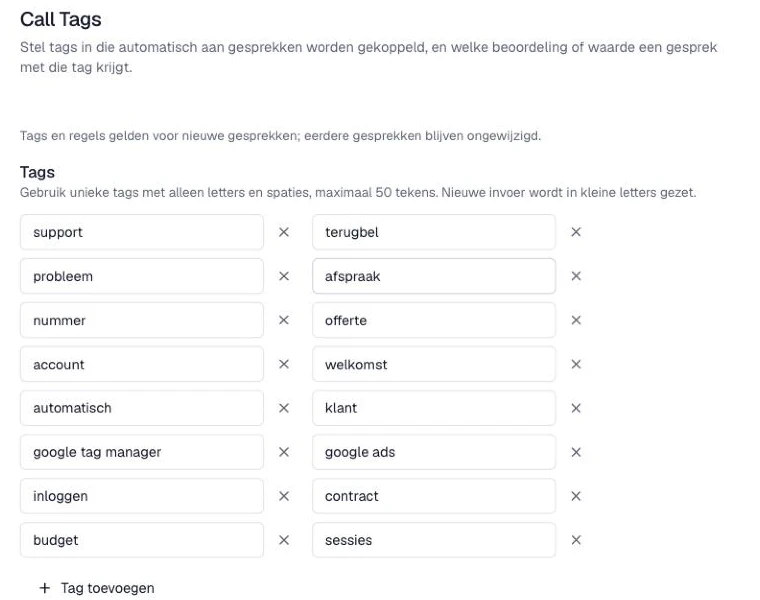
- In the Qooqie call tracking application, go to AI > Call Tags. You can also find this page as a tab under Modules > Call recording.
- Under ‘Tags’, click ‘Tag toevoegen’ (Add tag) and enter the tag.
- Use unique tags with only letters and spaces. Capital letters automatically become lowercase.
- Want to remove a tag? Click the cross next to the tag and confirm with ‘Verwijderen’ (Delete). If a rule uses this tag, the tag also disappears from that rule. If a rule is left without tags as a result, delete or fix that rule yourself.
- Click ‘Opslaan’ (Save).
Setting up rating rules
A rule rates a call automatically based on the tags found in it.
- Under ‘Beoordelingsregels’ (Rating rules), click ‘Regel toevoegen’ (Add rule).
- Under ‘Als het gesprek’ (If the call), choose whether the call must have ‘Minstens één’ (At least one) or ‘Alle’ (All) of the chosen tags.
- Under ‘van deze tags heeft’ (has of these tags), choose one or more tags. You can use a tag in only one rule.
- Under ‘Dan classificatie’ (Then classification), choose which lead classification the call gets, or leave it at ‘Geen’ (None).
- Optionally, enter a value under ‘En waarde’ (And value). Use a full stop as the decimal separator. A value of 0 is also a value; empty means the value doesn’t change.
- Click ‘Opslaan’ (Save).
Every rule needs tags and at least a classification or a value.
How the rules work
- The rules are checked from top to bottom. The first rule that matches counts.
- Tags and rules apply to new calls. Earlier calls stay unchanged.
- A call that gets a classification through a tag rule no longer gets a classification from ‘Automatisch beoordelen met AI’ (Rate automatically with AI). Read more in ‘How AI rates your calls automatically’.
Viewing tags
- Go to Calls > Overview.
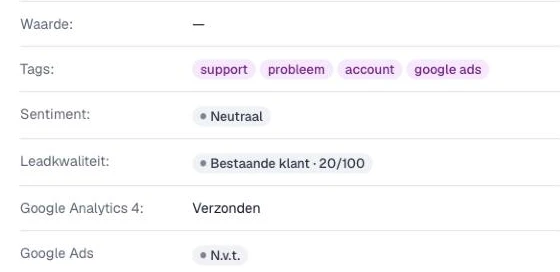
- Click a call. Under ‘Tags:’ you see which of your tags were found in the call. Under ‘Waarde:’ (Value) you see the value of the call.