When Call Summary is on, AI rates every recorded call: what did the caller want, is it a sales lead and how likely is it to turn into a job? You see that outcome with the call. Want calls to get a lead classification automatically based on this as well? Then set that up with ‘Automatisch beoordelen met AI’ (Rate automatically with AI). That way the conversion, with its value, goes to Google Ads, even if nobody rates the call themselves.
Note: this only works if call recording and Call Summary are on. Read ‘How to turn on call recording’ and ‘How to turn on Call Summary’. Only admins can change the setting.
How to turn on Call SummaryWhat the AI determines per call
For every call in which the caller says something (a real conversation or a recorded voicemail), the AI determines:
- Type of call: Nieuwe klant (new customer), Bestaande klant (existing customer), Service of klacht (service or complaint), Sollicitatie (job application), Acquisitie (sales pitch), Verkeerd verbonden (wrong number), Spam or Overig (other).
- Sales lead yes/no: can this call lead to a new paid job, appointment or sale?
- Score from 0 to 100: the likelihood that the call leads to new revenue.
- How found: how the caller says they found the business, for example ‘via Google’ or ‘recommended by the neighbour’. If the caller doesn’t say, this stays empty.
Viewing the outcome
- In the Qooqie call tracking application, go to Calls > Overview.
- Click a call to open its details.
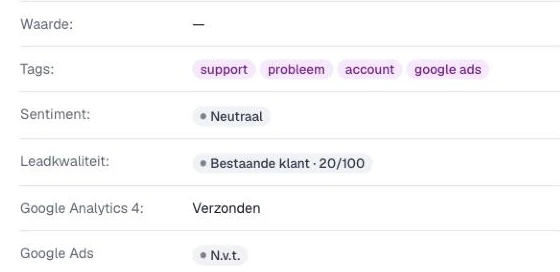
- Under ‘Leadkwaliteit:’ (Lead quality) you see the type of call and the score, for example ‘Nieuwe klant · 80/100’. Hover over it with your mouse to see whether it is a sales lead and why the AI thinks so.
- Under ‘Hoe gevonden:’ (How found) you see how the caller found you, followed by the category (for example Zoekmachine (search engine) or Aanbeveling (recommendation)).
Rating calls automatically
- In the Qooqie call tracking application, go to AI > Call Tags.
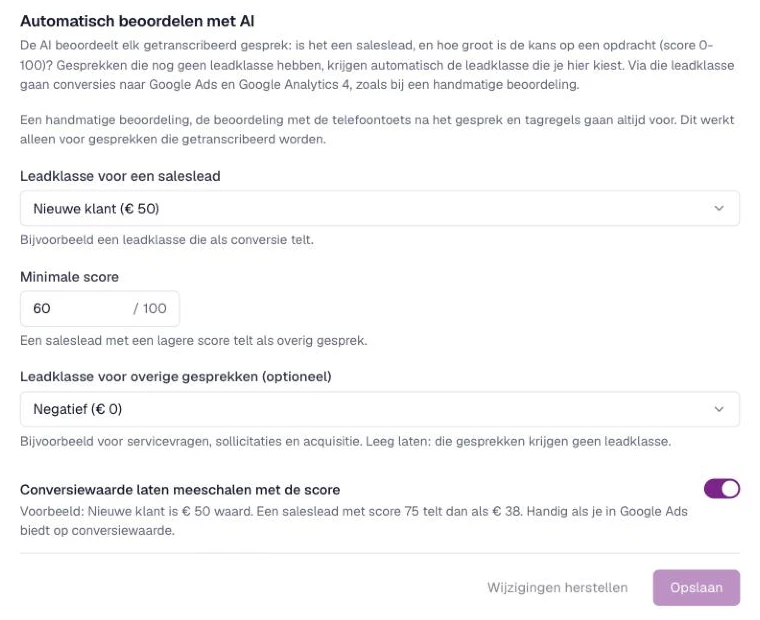
- Scroll to ‘Automatisch beoordelen met AI’ (Rate automatically with AI).
- Under ‘Leadklasse voor een saleslead’ (Lead class for a sales lead), choose the lead classification a sales lead gets, for example a classification that counts as a conversion.
- Under ‘Minimale score’ (Minimum score), enter a number from 0 to 100 inclusive. A sales lead with a lower score counts as an other call.
- Optionally, under ‘Leadklasse voor overige gesprekken (optioneel)’ (Lead class for other calls (optional)), choose a classification for things like service questions, job applications and sales pitches. If you leave this empty, those calls get no lead classification.
- Optionally, turn on ‘Conversiewaarde laten meeschalen met de score’ (Scale conversion value with the score). If a classification is worth € 200, a sales lead with score 75 counts as € 150. This is useful if you bid on conversion value in Google Ads.
- Click ‘Opslaan’ (Save).
Don’t have any lead classifications yet? Create them first via ‘Naar leadklassen’ (To lead classes). Read ‘How to manage lead classifications’.
How to manage lead classificationsWhat takes priority?
The AI only gives a lead classification to calls that have not been rated yet. A manual rating, the rating with the phone key after the call and tag rules always take priority. Which classification goes to Google Ads or GA4 as a conversion is set under ‘Conversies per leadclassificatie’ (Conversions per lead classification). Read ‘How to choose per lead classification which conversion goes to Google Ads or GA4’.
How to choose per lead classification which conversion goes to Google Ads or GA4