Does someone call more often? Then you don’t want to rate every call again. With ‘Beoordeling overnemen van vorige oproep’ (Copy rating from previous call), a new call automatically gets the last classification of the same caller. That way, an existing customer stays recognisable as a customer in your reports, for example.
Note: only admins can change this setting.
Turning it on
- In the Qooqie call tracking application, go to Modules > Call Review > ‘Beoordeling overnemen van vorige oproep’ (Copy rating from previous call).
- Turn on ‘Eerdere classificatie overnemen’ (Copy previous classification).
- Click ‘Opslaan’ (Save).
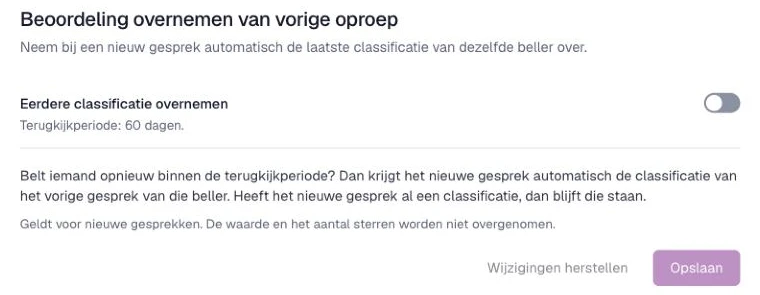
Want to turn it off again? Switch the toggle off and click ‘Opslaan’.
How it works
- Does someone call again within the lookback period? Then the new call automatically gets the classification of that caller’s previous call. You see the lookback period below the toggle, for example ‘Terugkijkperiode: 60 dagen.’ (Lookback period: 60 days.)
- If the new call already has a classification, it stays.
- Only the classification is copied. The value and the number of stars are not.
- It applies to new calls. Earlier calls don’t change.
How to set up classifications is explained in ‘How to set up call rating’ and ‘How to manage lead classifications’.
How to manage lead classifications